This was our project for CSE 4326, the Microprocessors and Microcontrollers lab at UIU. There were six of us: Shadman Siam Amin, Md. Tanvir Hassan, Fairoze Fatema Alam, Maisha Hossain Moumita, Meherin Sohani and me. All six of us play chess, and all six of us play it almost only on our phones.
There's always someone to play online, but it isn't the same as a real board. You can't pick the pieces up, and you're still staring at a screen. A real board needs a second person though, so most of the time it just stays in the box. Robot chessboards that play against you do exist, but they cost several hundred dollars, they only work with their own app, and you can't change anything about them.
So the question we picked was: can six students build one from parts we can get in the lab and the local market? An ordinary board that can see your move, think of a reply, and move its own piece.
That turned into Player Koi. We also made a 2½ minute animated explainer for the presentation, which is probably the fastest way to see what it does:
How it fits together
There are two computers in it, and each does the job the other one is bad at.
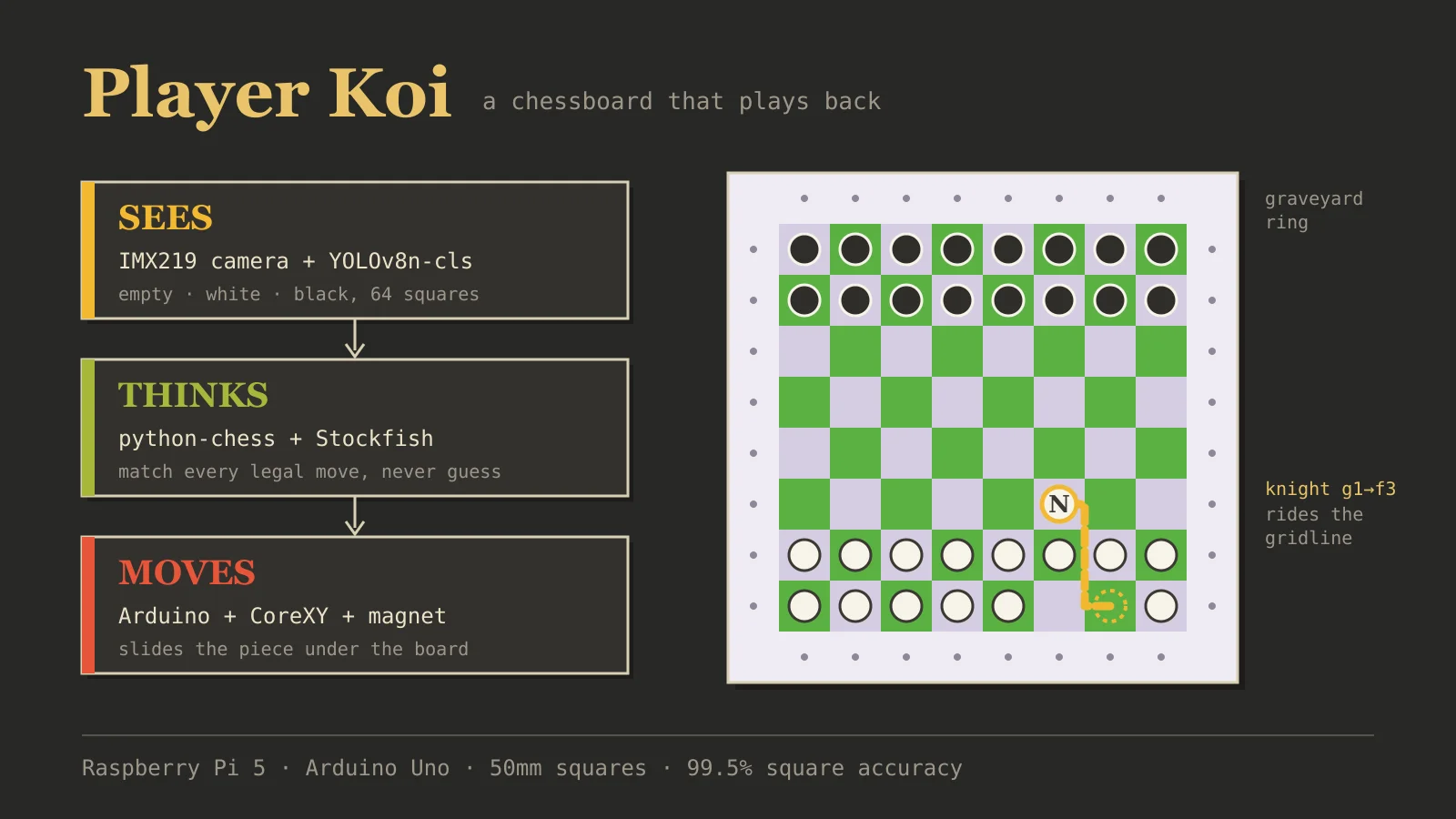
A Raspberry Pi 5 does everything that needs memory and maths. An IMX219 camera above the board looks straight down at it. When you move a piece, a cheap motion detector waits for your hand to come in and leave again, then a small model reads all 64 squares, works out which legal move you made, and hands the position to Stockfish for a reply.
An Arduino Uno with a CNC Shield does the one thing Linux is bad at, which is sending stepper
pulses with exact timing. It drives two NEMA 17 motors on a CoreXY frame under the board, and
the carriage carries an electromagnet. Every piece has a small magnet in its base, so the coil
grabs it through the board and drags it to the new square. The Pi talks to the Uno over USB
serial. The Uno knows nothing about chess, it just gets one command like MOVE e7e5, does it, and
replies OK.
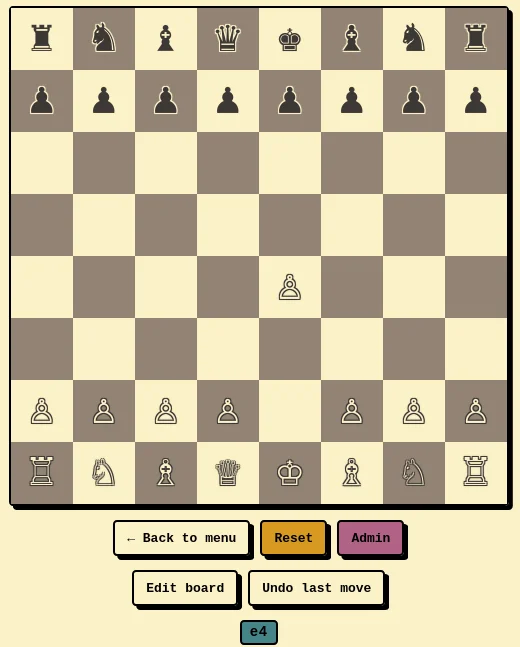
The Pi also serves a small web page, so any phone on the same Wi-Fi gets the live camera feed, the board as the system thinks it is, and the controls.
That's the plan, anyway. Getting there took a while.
Problem 1: The 3D prints took 4 to 5 tries
The first problem had nothing to do with chess or code. A lot of the gantry frame is 3D printed, including the parts that hold the linear rods. We designed them, printed them, and they didn't fit.
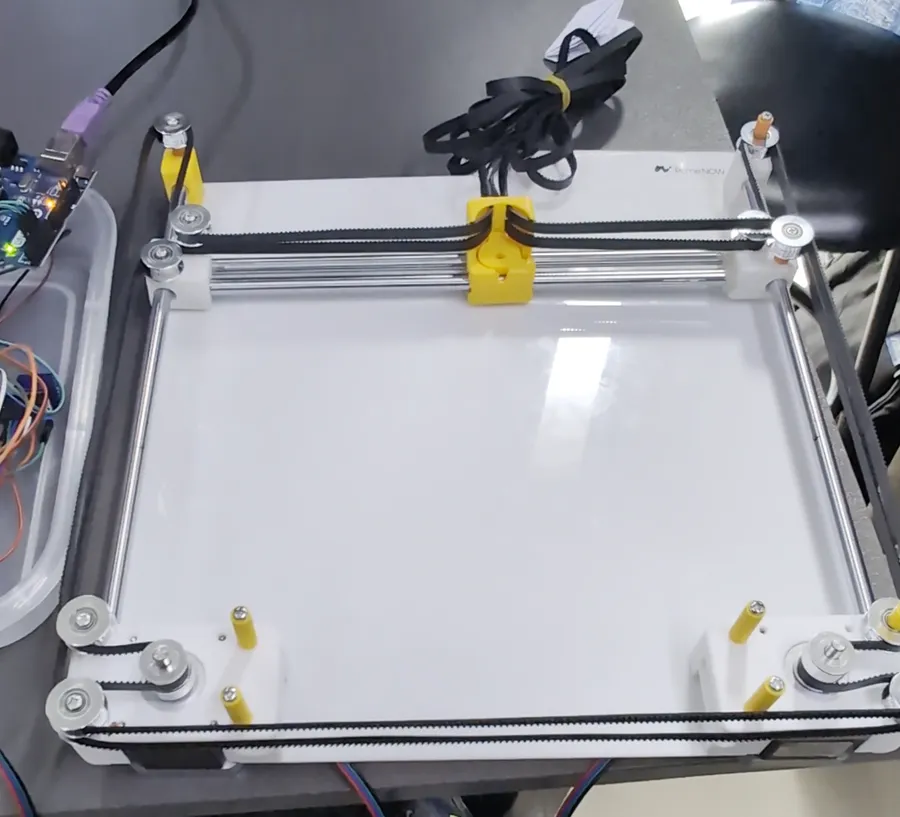
The two things that kept going wrong were the holes for the linear rods and the screw holes. A rod hole that's slightly too tight and the rod won't go in, or it goes in and binds. Too loose and the rod wobbles, which means the carriage wobbles, which means the magnet ends up somewhere slightly different from where the firmware thinks it is. The screw holes had the same kind of problem, they didn't line up with the frame or the mounts on the first attempts.
The annoying part is that every fix is slow. You change one dimension in the CAD file, wait hours for the print, try to fit it, and find the next problem. We went through about 4 to 5 rounds of prints before all the parts fit together properly.
Problem 2: Getting it to move the right distance
Once the frame was together, the next job was making the carriage go exactly where we told it to. The distance per step isn't something you measure, it's arithmetic from the parts:
const int   MICROSTEPS          = 2;
const float MOTOR_STEPS_PER_REV = 200.0;
const float PULLEY_TEETH        = 20.0;
const float BELT_PITCH_MM       = 2.0;

const float MM_PER_REV = PULLEY_TEETH * BELT_PITCH_MM;                     // 40
const float stepsPerMM = (MOTOR_STEPS_PER_REV * MICROSTEPS) / MM_PER_REV;  // 10
So 10 steps per millimetre, and one 50mm square is 500 steps. Simple. Except the first time we powered it up, every move went four times too far. It took us a while to find out why: the CNC Shield ships with its microstepping jumpers set to 1/8, and the firmware assumed 1/2. Four times the microsteps, four times the distance. Moving two jumpers fixed it.
The other half of calibration was speed. Steppers don't tell you when they skip a step, the carriage just ends up a little short, and on a chessboard a few millimetres off is enough to leave a piece on the line between two squares. When we pushed the speed up, it started losing steps. In the end we settled on a constant 40 mm/s, which was the fastest our frame could go without losing any. There's no acceleration ramp, it's slow but it's reliable.
It matters extra here because there are no limit switches. Before you start, you park the carriage in the corner beyond h1 by hand, and every position after that is counted from there. If a step gets lost, every move after it is off, and nothing on the Arduino side notices. That's one of the reasons the camera checks the robot's moves, which I'll get to.
Problem 3: The model, three times
This is the part we rebuilt the most.
Version 1: recognise every piece. The obvious way to read a chessboard from a camera is to recognise all 12 piece types on every square. Our first commit was exactly that, a YOLO26l detector trained on ChessReD, a public dataset of about 10,800 real photos of chessboards. It wasn't reliable enough to run a game on. And it turns out it's hard in general: the ChessReD authors' own end-to-end model gets every square right in only 15.26% of test images. If the people who made the dataset can't do it reliably, a lab group with a cheap camera and room lighting wasn't going to either.
Version 2: no model at all. Then we noticed something. The camera never actually needs to know what a piece is. A game always starts from the standard position, and after that python-chess knows the type of every piece because it applies every move. So the camera only has to answer a much easier question for each square: is it empty, white or black?
Our first try at that easier question used no model at all, just hand-tuned pixel colour thresholds. Detecting whether a square was occupied worked fine. Telling white from black never became reliable. We locked the camera's exposure, used bigger calibration bursts, added background subtraction, and it got better each time but never good. Shadows, glossy highlights and low-contrast pieces kept breaking it, and at some point it was clear the problem was the approach, not one more constant.
Version 3: a small model on our own data. So we went back to a model, but a tiny one for the easy question. We fine-tuned YOLOv8n-cls, ImageNet-pretrained, on 64×64 crops of squares from our own board, with three classes. It's about 2.9 MB, it's exported to NCNN, and it runs on the Pi's CPU with no accelerator. Each move is read over three frames, and a square only counts if two of the three agree with confidence of at least 0.5. Otherwise it's marked unresolved instead of guessed.
Then the colours get matched against chess. For every legal move, we play it on a scratch copy of the board and see which squares would change colour:
def _expected_delta(self, move):
    scratch = self.board.copy(stack=False)
    before = scratch.piece_map()
    scratch.push(move)
    after = scratch.piece_map()

    delta = {}
    for square in set(before) | set(after):
        before_color = _color_name(before[square].color) if square in before else "empty"
        after_color = _color_name(after[square].color) if square in after else "empty"
        if before_color != after_color:
            key = (chess.square_file(square), chess.square_rank(square))
            delta[key] = after_color
    return delta
The squares the camera saw change are compared with this for every legal move. If exactly one
matches, that's your move, and you get real notation like Nf3 for free. Castling (four squares
change) and en passant (a square that's neither the from nor the to changes) just work, because
python-chess already knows those rules. If nothing matches, or more than one thing does, it
doesn't guess. It flags the squares and the web UI offers Undo and Edit board.
For training data we wrote a collection script: it picks random squares to be white, black or empty, someone places any piece of that colour, and it saves six frames of all 64 squares. We did 12 to 15 rounds in each of three setups (different room, lighting and camera position), 23,440 crops in total. Whole rounds go into train, validation or test, never split frame by frame, since frames from one round are almost identical and splitting them would leak into the test set. Training took about 11 minutes on an RTX 5060 Ti.
Here's the test accuracy per setup:
| Setup | Crops | Accuracy |
|---|---|---|
| Env 1 (session A) | 768 | 100.0% |
| Env 1 (session B) | 1,152 | 66.7% |
| Env 3 | 768 | 98.4% |
| Env 4 | 768 | 100.0% |
| All, raw | 3,456 | 88.5% |
| All except session B | 2,304 | 99.5% |
When we first saw 88.5% we were confused, because two of the setups were basically perfect. So we grouped the mistakes by collection round, and 384 of the 396 errors came from one session. We opened those crops, and the model was right. The labels were wrong. Squares saved as "black" showed an empty square or grey floor off the edge of the board, most likely because the board or camera got bumped after calibration during that session. Without it, the model gets 2,292 of 2,304 right.
If we had only looked at the accuracy number, we would have spent days tuning a model that wasn't broken. Looking at the actual images took ten minutes.
Problem 4: The board was too small
This was the most physical problem, and the one that changed the machine the most.
The first board was 230×230mm with 28.75mm squares. Moving a pawn or a rook was fine, the piece slides from the centre of one square to the centre of another, and chess rules already guarantee the path is clear. The trouble was everything that can't go in a straight line:
- Knights jump over pieces, and ours can't jump. It has to squeeze between them.
- Castling moves the rook past the king that just jumped over it.
- Captures have to drag the captured piece off the board, past everything in the way.
The way through is to drive along the lines between the squares. On 28.75mm squares that line is only about 14mm from the centre of each neighbouring piece, and a piece base is 13 to 15mm wide. So the carried piece was basically touching its neighbours on the way past, and our 25mm magnet's edge came within about 2mm of their centres. The magnet would pull neighbours along, or push them off their squares, and a knight going between two pawns sometimes brought one of them with it.
We tried fixing it in software and with magnet power, but the real problem was geometry, so we fixed the geometry. The new board has 50mm squares: a 400×400mm playing area printed as a sticker on a 570×570mm laser-cut panel, with the gantry travelling 480×470mm under it. Now the line between two squares is 25mm from each piece, and the magnet's edge stops 12.5mm short of them. That's enough room to do the moves properly.
A knight now goes in an L made of straight lines: half a square sideways onto the gridline, the long run along it, then half a square back onto the target square.
float sx = df > 0 ? 0.5 : -0.5;
float sy = dr > 0 ? 0.5 : -0.5;
bool shortIsFile = abs(df) < abs(dr);
float hx = shortIsFile ? sx : 0.0;
float hy = shortIsFile ? 0.0 : sy;

gotoSquare(f0, r0);                       // pick up at the centre
gotoSquareF(f0 + hx, r0 + hy);            // half a square onto the gridline
gotoSquareF(f1 - hx, r1 - hy);            // the long run along it
gotoSquare(f1, r1);                       // half a square back onto the target
(The real doKnight also switches the coil and checks every step against the travel limits.)
Castling uses the same idea. The king goes first, then the rook leaves its square along the gridline so it can get past the king without touching it.
Captures use the space the bigger panel gave us. There's a 32-slot "graveyard" ring in the margin around the board, eight slots per side. The captured piece goes first, dragged along the gridlines to the nearest free slot, and only then does the capturing piece move in. Dragging onto an occupied square would just shove two pieces around.
The bigger squares also brought a few magnet lessons with them, all from watching things fail:
- Grip longer. With a 150ms grip pause, knights slipped off the magnet on the long leg of the L. Now the coil holds still for a full second so the piece seats flat before it's asked to move.
- Full power on the gridline. At 60% and then 80% power, pieces sometimes got left behind halfway. So those legs run at full power now, which only works because the neighbours are far enough away.
- A small reverse pulse after every set-down. The magnet's core kept a bit of magnetism after switching off, enough to pull the next piece toward the carriage before it even got there. A short, weak pulse the other way clears it.
Closing the loop with the camera
Since there are no limit switches and a belt can always slip, we didn't want to just trust the robot. A robot move only counts once the camera has seen it. Before the gantry moves, the tracker is told this is the only move it may accept. Tracking pauses while the pieces move, then all 64 squares are read again. If the camera sees exactly that move, it's committed. If it sees anything else (a slipped belt, a piece left behind, a hand in the way), the arm stops and the UI asks you to fix the board.
We chose to stop instead of retrying, because a second move played on top of a wrong position just makes the mess bigger.
The software side has 555 unit tests that run in about 2.4 seconds on a laptop with no camera, Arduino, model or Stockfish, using fake hardware: a gantry that acknowledges commands without moving, a fake camera read, and a gantry that fails on purpose halfway through a move to prove the coil drops and everything halts.
What's still broken
We got it working, but not everything is fixed:
- No limit switches. Position is still dead reckoning from a hand-parked corner. Power it on with the carriage somewhere else and every move is off until the camera check catches it.
- HALT isn't instant. The firmware's motion is blocking, so HALT only stops the next command. To stop a move that's already running, you pull the power jack.
- New room, new training. The model sees the board surface as background, so different lighting or a different board means collecting a few rounds and fine-tuning again. Our first model, from before the other setups were collected, only gets 80.6% on the current test set.
- The bad session is still in training. Session B's mislabelled rounds are still in the training set. Deleting them and retraining is next.
- Promotion needs a human. The arm can't fetch a queen, and the camera can't tell a queen from a pawn anyway, so it asks you to swap the piece.
- The rods sag. Ø8mm rods over a roughly 500mm span bend a little under the carriage, so the grip can be weaker in the middle of the board than near the edges.
What I took away from it
Looking back, the biggest fixes weren't better tuning. They came from changing the problem.
We spent a long time trying to make the vision recognise pieces, and the answer was to stop asking it to. We tried to route pieces carefully between neighbours on a tiny board, and the answer was a bigger board. Even the 88.5% accuracy that worried us wasn't a model problem at all, it was a data problem that a quick look at the images solved.
The other thing is that hardware is slow in a way software isn't. A bug in Python costs you a minute. A wrong hole in a printed part costs you a day. After four or five reprints you start measuring everything twice.
Code, firmware, the report and the explainer are at github.com/TheRealNightmare/PlayerKoi. Built with Shadman Siam Amin, Md. Tanvir Hassan, Fairoze Fatema Alam, Maisha Hossain Moumita and Meherin Sohani. The rest of what I've been building is on the projects page.